Gmail attachment downloader for bulk ZIP exports. Save PDFs, images, invoices, and files faster.
BulkZip is a Gmail attachment downloader built for one job: helping you bulk download Gmail attachments and export them as a clean ZIP. If you have ever tried to save invoices one-by-one, download all images from Gmail, or collect PDFs from hundreds of emails, this turns that slow admin task into a search, filter, select, download workflow.
It works especially well for founders, finance teams, bookkeepers, operations staff, and UK small businesses that need to export receipts, invoices, statements, contracts, and project files for bookkeeping and record keeping. You can search Inbox, Sent, or Anywhere, filter by sender and date ranges, and then download a clean ZIP to your computer.
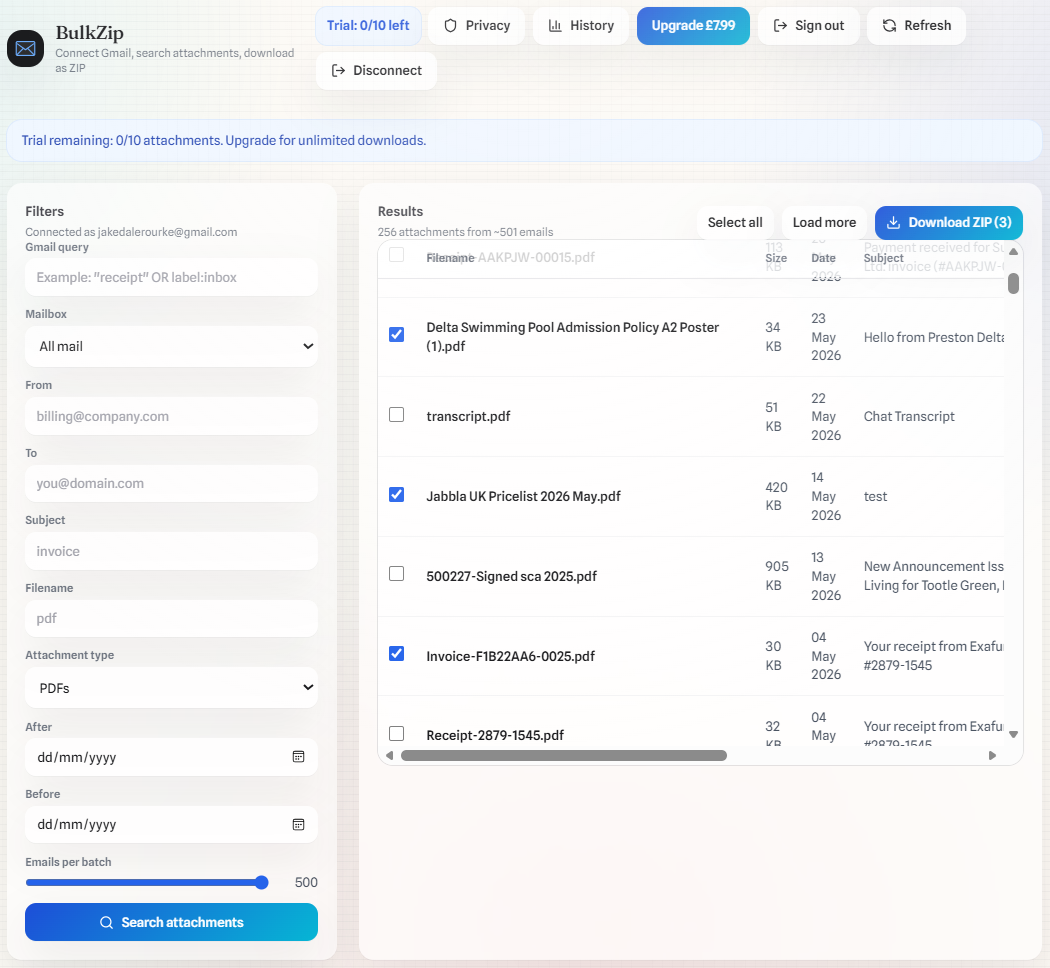
For recurring admin tasks, BulkZip becomes a repeatable "download Gmail attachments as a ZIP" workflow. Run one search for invoices, receipts, a client name, or a label, select everything you need, and download a single ZIP for your folders instead of opening and saving every email manually.
Tap to view a full-screen screenshot.
Quick start
If you’re trying to download all attachments as a ZIP from Gmail, this is the shortest path. You can always refine later with sender, date range, subject, and filename filters.
-
Step 1Connect GmailAuthorize read-only Gmail access for searching and downloading attachments.
-
Step 2Search attachmentsSearch for Gmail attachments and filter by inbox vs sent, sender, date range, subject, and filename.
-
Step 3Download ZIPSelect attachments and export a ZIP (multiple ZIPs for very large exports).
How BulkZip helps you bulk download Gmail attachments
Gmail is great at finding emails, but it’s slow when you need to download attachments at scale. BulkZip is built around the exact workflow Google users search for: bulk download Gmail attachments, then export a ZIP archive you can store in folders.
That matters when you are cleaning up finance admin, preparing month-end records, saving supporting documents for accountants, pulling together project handovers, or archiving images and PDFs from years of email. Instead of treating Gmail like a file manager, BulkZip turns your mailbox into a searchable export workflow.
Common exports
These are the most common “bulk download Gmail attachments” workflows. Each one is a focused guide with exact Gmail search filters to use.
Most users are not trying to download every attachment they have ever received. They usually want a clean export for a specific admin task, file type, supplier, client, or date range. Starting from a focused export keeps ZIPs tidy and reduces the amount of manual cleanup needed afterwards.
Use cases
This is where BulkZip is most useful for busy Gmail accounts. Pick a use-case, apply one or two filters, then export a ZIP you can store or share.
Teams use BulkZip when they need a Gmail attachment downloader that is practical, not technical. Admin and finance workflows benefit from cleaner archives, agencies can export client files faster, and anyone dealing with recurring email documents can avoid hours of repetitive saving and folder sorting.
Privacy & trust
BulkZip uses read-only Gmail access to list emails and fetch attachments you choose. Downloads happen on demand and you can disconnect at any time. BulkZip is not affiliated with Google.
The goal is simple: help you export the files you need without turning your mailbox into another app you have to manage. If you want a lightweight way to download Gmail attachments as a ZIP, keep local records, and move on with your day, that is exactly the job this product is built for.
Why people use a Gmail attachment downloader
A lot of Gmail users do not need a full document management system. They just need a dependable way to bulk download Gmail attachments, keep a local archive, and stop wasting time on repetitive clicks. BulkZip gives you that middle ground: faster than manual saving, simpler than building a custom workflow, and focused on the search filters people already understand.
For bookkeeping, it means collecting invoice PDFs and receipt emails into a single ZIP before month-end. For operations, it means exporting signed files, statements, reports, or attachments from a specific supplier. For creative and client teams, it means downloading images, drafts, or deliverables from long email threads without losing track of filenames.
It also helps reduce manual mistakes. When you download attachments individually, it is easy to miss a message, duplicate a file, or save into the wrong folder. A filtered export makes the process more repeatable, which is why many users prefer to start with a sender, subject, date range, or file type and then save one clean ZIP.
What BulkZip does
BulkZip is designed for people who already know what they are looking for in Gmail but do not want to save every attachment by hand. Connect your account, search for relevant messages, narrow the results with filters, and export the files you want as a ZIP. That makes it useful for one-off cleanups as well as recurring monthly admin tasks.
If you need to download all images from Gmail, export attachments from Sent mail, or save PDF attachments from Gmail, the workflow stays the same. Search first, review the files, then export a ZIP that is ready for local storage, accounting handoff, or project folders.
If you are comparing options, the main advantage is clarity. BulkZip is not trying to replace Gmail or become a heavy admin platform. It focuses on one high-intent job and does it cleanly: helping you download Gmail attachments in bulk with better search control and a much faster export process.
Small business proof points
Open the app, run a search, and export a ZIP. Use guides for exact filters.
Real BulkZip UI: search → select → download ZIP.
New accounts can download up to 10 attachments. Upgrade once for unlimited downloads.
Popular guides
These pages answer the exact “how do I…” queries people search for when they need to download Gmail attachments in bulk.
They also help you move from a broad search like “gmail attachment downloader” to a more precise task, such as exporting invoices, saving images, filtering by sender, or downloading attachments from a date range.
FAQ
These answers match the workflows people most often search for before choosing a Gmail attachment downloader.